How I Installed the Latvian MS Office 2010
One evening I decided to help a good person with buying a new computer and installing the necessary software. The computer was intended for work purposes, so both objective needs and capabilities were carefully assessed. The installation went fairly smoothly until the realisation hit that a Latvian language spell-checker was also needed.
One evening I decided to help a good person with buying a new computer and installing the necessary software. The computer was intended for work purposes, so both objective needs and capabilities were carefully assessed. The result was that the computer was purchased with an OEM operating system and MS Office 2010 Retail version Home and Business. For general information, MS Office is available in 3 price tiers: Home and Student, Home and Business and Professional. They differ only in which office programs are included. For example, Home and Business includes Outlook, Word, Excel, PowerPoint and OneNote. The Retail version is essentially just a registration key (code). The program installation must be downloaded from the Microsoft website. True, doing it for the first time, some time was spent searching for the right section (I generously share the link [1]).
So, I found two versions - English and Latvian. Following the client's wishes I began installing the English version, until at some point it dawned on me that a spell-checker would also be needed. Preferably for Latvian, Russian and English. When choosing which packages to install and which to leave out, I had noticed that the English version only comes with English and Spanish spell-checkers. Without much deliberation, the installation was stopped. Next, two choices lay ahead - install Proofing Tools or install (at least attempt) the Latvian version, since I thought that if all versions are "trial", why not take advantage of that.
I began installing Latvian MS Office 2010. To both my and the computer owner's delight, we discovered that the Latvian MS Office 2010 comes with the following spell-checkers - Latvian, Russian, English and German. At the next step, when the installation and file copying should have started, the following message appeared:
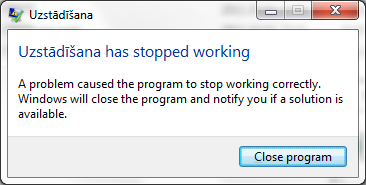
Figure 1. Setup has stopped working.
The same thing repeated on the second and third attempt, until the idea arose to check whether perhaps the English version had somehow installed and was interfering. We went to Control Panel > Programs > Uninstall program and tried to uninstall. But what a nuisance:
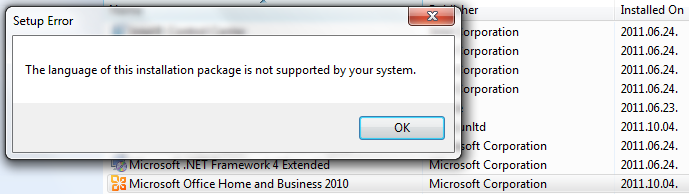
Figure 2. The language of this installation package is not supported by your system.
After a long and thorough search for a solution, a useful guide was found on the Microsoft website itself [2]. It turns out the problem is well-known and special utilities have even been created to resolve the issue. Finding the right version, I downloaded and ran it. After a few minutes of work, the magic tool reported that everything that could be done had been done.
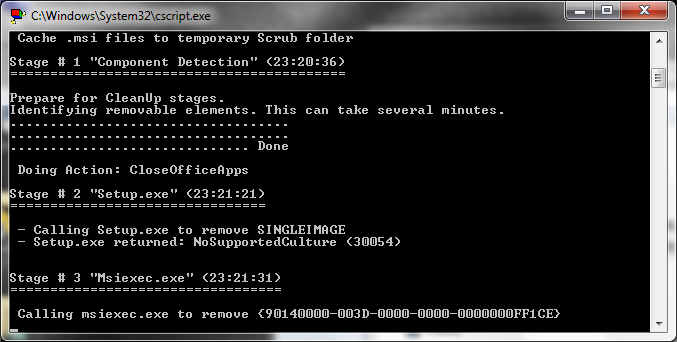
Figure 3. Uninstall Office by using fix - in process
From all of this I drew the following conclusions:
1. MS Office 2010 Latvian is worth installing at least for the spell-checkers. Bear in mind that the interface will also be in Latvian (without the option to switch to English);
2. I still could not find Latvian online shops where spell-checkers for other languages (Proofing Tools) can be purchased. When buying from Microsoft, such an option is offered, charging 27 EUR per language;
3. The installation process has not become one bit more user-friendly in cases where an unexpected error is encountered, as was the case this time.
comments